Getting Started
Transcribe, Edit, and Clean Up
Transcription
After importing media and downloading the model, start the transcription. Sequence processes the media locally; it does not upload the recording to a cloud transcription service.
When you create a variant, you can copy the transcript from an existing tab instead of transcribing the same source again.
Understand the workflow
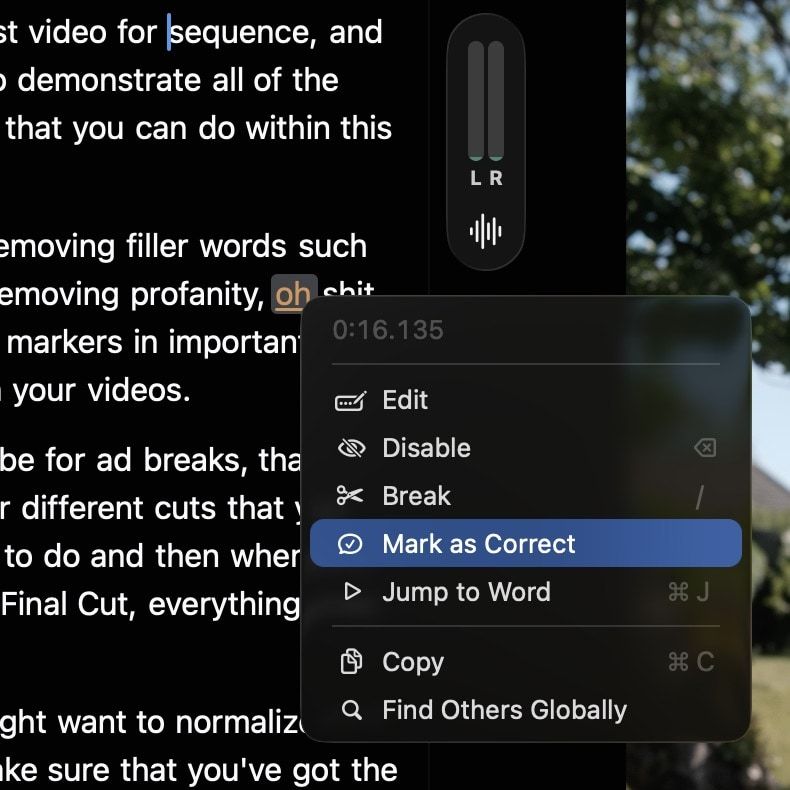
Edit
If a word is wrong, right-click it and choose Edit. Sequence opens the word inline so you can correct it without leaving the playback view. Editing the text does not replace or alter the source audio.
Mark as Correct
Words highlighted in orange have a lower confidence score from the transcription model. If the word is correct, right-click and choose Mark as Correct to remove the highlight. If it is wrong, choose Edit and type the correction.
Disable / Enable
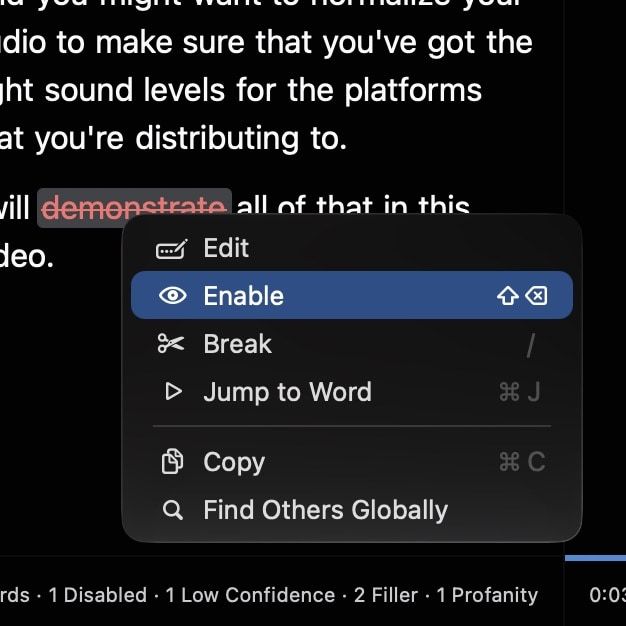
Disable removes the selected words from the active transcript and timeline output while keeping the decision reversible. Restore a selection with Enable, or use Enable Disabled Words in the transcript options menu to restore all manually disabled words.
Break Sentence
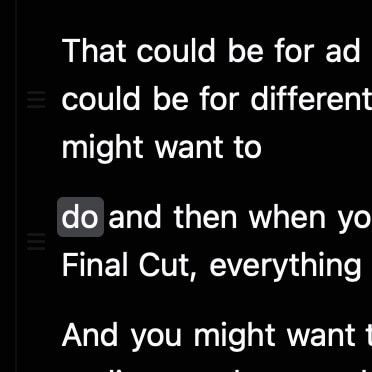
Break Sentence splits a sentence group at the selected word. Use it when the transcript has grouped too much text together and you need a clearer unit for review, captions, or export. The default shortcut is /.
Move Sentence Up or Down
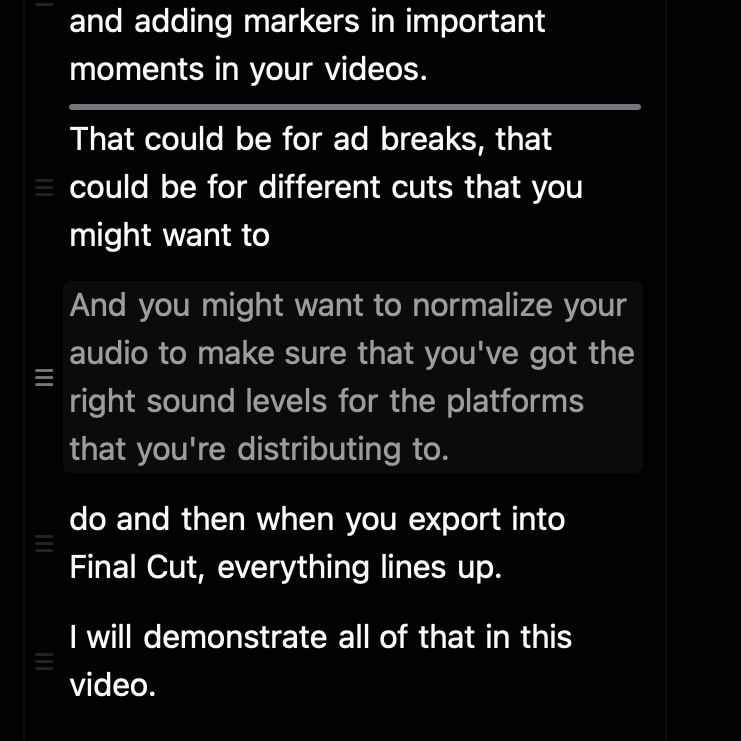
Move Sentence Up and Move Sentence Down reorder sentence groups in the transcript. Use them to shape the rough cut while keeping the source media untouched.
Group Sentences
When you select words across multiple movable sentence groups, Group Sentences combines those sentences into one group. Use it when a sentence split too aggressively or when two short transcript rows should behave as one unit for editing and reordering.
Jump to Word
Right-click a word and choose Jump to Word (⌘J) to move the playhead to its timestamp.
Copy
Copy places the selected transcript text on the clipboard. Use Copy Full Transcription in the transcript options menu for the complete visible transcript. Disabled words are omitted and the active profanity redaction is respected.
Find Others
Find Others searches for the selected word elsewhere in the transcript. Use it to review a repeated name, technical term, or transcription mistake.
Select and act on transcript text
Click and drag across words to make a selection, or drag through the empty area around transcript rows to marquee-select several sentences. The floating selection bar keeps the most useful actions close to the selection, including jumping to its start, copying text, enabling or disabling words, and creating a variant from the selected material.
For a multi-word selection, Jump to Start of Selection seeks to the first playable word. A selection that begins with removed silence or other non-playable timeline content cannot be used as a jump target.
Adjust transcript text size
Use Transcript → Bigger Text (⌘+), Smaller Text (⌘-), or Actual Size (⌘0) to change only the transcript’s type size. Sequence remembers the choice and preserves the visible position, selection, and inline-editing focus while the layout changes. Transcript rendering also respects the macOS Bold Text accessibility setting.
Create a variant from a selection
Select transcript material and choose the variant action to create a new version based on that selection. This is useful for pulling an excerpt, answer, or short clip out of a longer recording while retaining its relationship to the source project.
Cleanup
The transcript options menu contains project-wide cleanup tools. These scan the active variant for filler words, profanity, or silence using the settings you configured.
Filler Words
Filler Words finds configured hesitation terms and can hide them from the transcript and edit. Review the result so useful rhythm and meaning are not removed with the filler.
The inspector lets you choose whether this variant should hide filler words or show all words. If you leave it using the app default, Sequence follows the global filler word setting; if you customize it, the variant stores its own override. If you later change your mind, reset clears the variant override and Re-Apply runs the current filler list against any visible leftover matches.
Profanity
Profanity opens the cleanup inspector for words in your profanity list. Use the app defaults or customise the handling for the active variant, so one version can be stricter while another stays closer to the original media.
For playback and export, Sequence supports Skip, Silence, Beep, and Text Only. Skip removes the word from the edit, Silence mutes that range, Beep adds a generated censor tone, and Text Only leaves the audio unchanged while redacting transcript and caption text.
When a word is redacted in text, choose whether to keep its edges, interleave replacement symbols, or mask it completely. You can also choose a custom symbol.
Manage the profanity word list in Settings. Reset clears the variant’s saved playback and caption-redaction choices. Re-Apply processes visible matches using the current list and settings.
Remove Silence
Remove Silence finds quiet ranges using the chosen threshold and removes them from the active edit. Restore an individual range with Restore Silence when a pause is useful for timing.
Enable Disabled Words
Enable Disabled Words brings back words you manually disabled. It does not mean every filter is permanently removed; filler, profanity, and silence have their own controls and reset options. Think of it as the undo path for manual hide decisions you made from the context menu.
Find Within Transcript
Find Within Transcript searches the current transcript. Use it to locate a word or phrase in a long recording without scrolling through the whole project.
Delete Transcript
Delete Transcript clears the transcript for the current variant. Use it when you need to transcribe the source again from scratch.